 OSC is a widely used protocol for wireless communication between devices. Arduino is a tremendously popular platform to create physical computing devices. So naturally, one would think that engaging in OSC communication using Arduino’s would be straight-forward and well documented. Unfortunately, I found very little help on the internet on this topic. Most searches led to one of two existing methods to get OSC out of an Arduino:
1. Using Processing as a middleman – this requires sending data from the Arduino over serial to a computer running Processing, which then generates and transmits OSC. So to talk between two Arduino’s, an entire computer is required? No good.
2. Using the Ethernet Sheild and a library called ArdOSC – excellent stuff, but this library is written to work with the ethernet library only, and I’m using an RN-XV WiFly module. No wires.
Neither of these solutions worked for me so I figured this is a topic worth exploring further. Previously, I had been able to use the RN-XV to send raw data over UDP. OSC data is also transmitted over UDP, so it should just be a matter of correctly generating OSC on the Arduino.
Start Simple
To test this hypothesis, I took some simple OSC from OpenSoundControl.org
OSC is a widely used protocol for wireless communication between devices. Arduino is a tremendously popular platform to create physical computing devices. So naturally, one would think that engaging in OSC communication using Arduino’s would be straight-forward and well documented. Unfortunately, I found very little help on the internet on this topic. Most searches led to one of two existing methods to get OSC out of an Arduino:
1. Using Processing as a middleman – this requires sending data from the Arduino over serial to a computer running Processing, which then generates and transmits OSC. So to talk between two Arduino’s, an entire computer is required? No good.
2. Using the Ethernet Sheild and a library called ArdOSC – excellent stuff, but this library is written to work with the ethernet library only, and I’m using an RN-XV WiFly module. No wires.
Neither of these solutions worked for me so I figured this is a topic worth exploring further. Previously, I had been able to use the RN-XV to send raw data over UDP. OSC data is also transmitted over UDP, so it should just be a matter of correctly generating OSC on the Arduino.
Start Simple
To test this hypothesis, I took some simple OSC from OpenSoundControl.org
 2f (/)  6f (o)  73 (s)  63 (c)
 69 (i)  6c (l)  6c (l)  61 (a)
 74 (t)  6f (o)  72 (r)  2f (/)
 34 (4)  2f (/)  66 (f)  72 (r)
 65 (e)  71 (q)  75 (u)  65 (e)
 6e (n)  63 (c)  79 (y)  0 ()
 2c (,)  66 (f)  0 ()    0 ()
 43 (C)  dc (Ü)  0 ()    0 ()
The byte array equivalent in C for Arduino looks like this:
char data[] = {0x2f, 0x6f, 0x73, 0x63, 0x69, 0x6c, 0x6c, 0x61, 0x74, 0x6f, 0x72, 0x2f, 0x34, 0x2f, 0x66, 0x72, 0x65, 0x71, 0x75, 0x65, 0x6e, 0x63, 0x79, 0x00, 0x2c, 0x66, 0x00, 0x00, 0x43, 0xdc, 0x00, 0x00};Since this is kind of difficult to look at and work with, we can instead use char arrays. Char arrays can be more readable, but how do you convert a float to a char array? There’s a neat “trick” to do this in C using the union keyword. Here’s some working Arduino code for sending OSC messages with a single float argument. The first message sends 0.1, the next 0.2, and so on until 1.0 is reached and then it’s reset back to 0.1.
#include "RNXV.h"

RNXV rnxv = RNXV();
float f;
union u_tag {
  byte b[4];
  float fval;
} u;
void setup() {
  f = 0.1;

  Serial.begin(9600);
  Serial1.begin(9600);

  rnxv.setUart(&Serial1);
  rnxv.join("SSID_HERE","PASSPHRASE_HERE");
  rnxv.enableUdp("192.168.1.5", 3000, 4000);
  rnxv.sendCommand("join", "AOK");
  Serial.println(rnxv.ip());
}
void loop()
{
  delay(1000);
  if (f > 1) f = 0;
  f = f + 0.1;

  char data[32] = "/oscillator/4/frequency\0,f\0\0";
  u.fval = f;
  data[28] = u.b[3];
  data[29] = u.b[2];
  data[30] = u.b[1];
  data[31] = u.b[0];

  Serial.print("print use loop: ");
  for (int i = 0; i <= 31; i++){
    Serial.print(data[i]);
  }
  Serial.println();

  rnxv.sendOsc(data, 32);
}
The code references an RN-XV library I’ve been working on to set up UDP and send the byte array as follows:
void RNXV::sendOsc(char data[], int size)
{
  for(int i = 0; i < size; i++)
    _uart->print(data[i]);
  delay(75);
}
I tried various delays and a delay of 75 seemed just enough that there wouldn’t be any corrupted OSC messages even when running the code for hours. This delay and the minimal code above resulted in about 13 OSC messages transmitting per second. It is also necessary to loop and send the exact number of chars as a message contains, or else the receiving end doesn’t recognize the end of the message and throws errors.
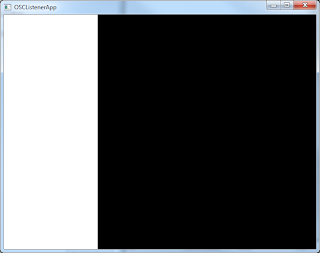 On the receiving end, I once again used the sample app that comes with Cinder and it’s OSC Cinder block. See the “Listening with Cinder” section in this post to see how to run the sample app, no code is required. (Note that you may need to restart the app once because at first it inadvertently receives a message “exit” which is the RN-XV going into data mode). If everything is working you should see a window like this one where the white section slowly expands:
OscPkt and AVR-STL
At this point, having proved the concept, I was about to dive into writing my own library to generate the OSC, but thought I’d try one last time to find something off the shelf to do this.
OscPkt, the minimalittlest OSC library for C++ seemed perfect for the job, being super concise and all contained in a single header file. It also was not tightly coupled with any UDP library so I could use my sendOsc function (above). However it depended heavily on C++ Standard Library classes (like vector) which don’t exist for Arduino.
Except they do – a brilliant piece of work by Andy Brown is AVR-STL. It brings STL to Arduino. He has all the instructions on his blog post. Simply download and put all header files in the include folder into …arduino-1.0.1\hardware\tools\avr\avr\include.
Once AVR-STL was integrated, I took oscpkt.hh, renamed it to oscpkt.h and added the following two #includes at the top (as per the instructions found on the AVR-STL page):
#include
#include
Then placed it in a folder “oscpkt” which I threw into my Arduino “libraries” folder. Now you can add the following to any Arduino sketch:
#include "oscpkt.h"
setup() {
oscpkt::Message msg;
oscpkt::PacketWriter wr;
msg.init("/foo");
wr.init().addMessage(msg);
Serial.println(wr.packetSize());
Serial.println(wr.packetData());
} Previous posts about this project include the following topics:
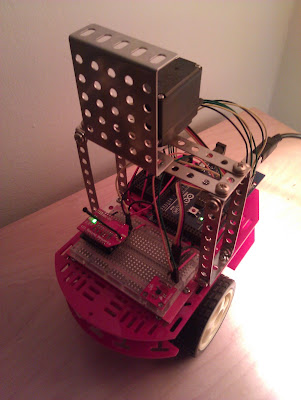
1. A low-cost and easy Robot Chassis to serve as the body of the robot.
2. Adding a RN-XV WiFly Module to enable wi-fi connectivity.
3. A Python Server which communicates with the robot.
4. Adding a Sensor and Actuator and transmitting data as JSON.
In #3 and #4, I utilized a Python Server with JSON as the data format. Here we try out a C++/Cinder Server with OSC as the communication protocol.
Previous posts about this project include the following topics:
1. A low-cost and easy Robot Chassis to serve as the body of the robot.
2. Adding a RN-XV WiFly Module to enable wi-fi connectivity.
3. A Python Server which communicates with the robot.
4. Adding a Sensor and Actuator and transmitting data as JSON.
In #3 and #4, I utilized a Python Server with JSON as the data format. Here we try out a C++/Cinder Server with OSC as the communication protocol.